Why Is My Samsung Family Hub Refrigerator Water Filter Light On?
On this page (6 sections)
Your Samsung Family Hub refrigerator water filter light is on because the filter needs to be replaced. This light is a helpful reminder to ensure your family is always drinking clean, fresh-tasting water. It’s a common and important maintenance alert.
This notification system is designed to keep your refrigerator’s water dispenser working optimally. It monitors the usage of your water filter and alerts you when it’s time for a change to maintain water quality. Ignoring this light could eventually affect the taste of your water and ice.
- The light means your water filter is nearing the end of its life.
- Replacing the filter ensures you continue to get clean, good-tasting water.
- You can usually find replacement filters on Samsung’s website or at major appliance stores.
- Don’t worry, it’s a simple fix to keep your water fresh. Replacing the filter is a simple fix to keep your water fresh.
Below, we’ll walk you through exactly why that light is on and what you should do next to get it reset. Let’s make sure your water stays wonderfully pure!
Understanding Your Samsung Family Hub Refrigerator’s Water Filter Light
Your Samsung Family Hub refrigerator has a special indicator light. This light lets you know it’s time to swap out your water filter. Think of it as a friendly nudge for your fridge. It helps you keep your family’s water fresh and clean. This system is quite smart. It tracks how much water you use. When the filter reaches its limit, the light turns on. This is a normal part of refrigerator maintenance.
Why That Little Light Matters
So, what’s the deal with this water filter light? It’s a helpful reminder, plain and simple. Your refrigerator’s water filter does a vital job. It removes impurities from your tap water. This includes things like chlorine, sediment, and lead. These can affect the taste and smell of your water. They can also impact the quality of your ice cubes. Over time, the filter gets clogged. It can’t do its job as effectively. The light signals that this time has come.
According to many appliance experts, filters typically last about six months. This can vary based on your water usage. It can also depend on the hardness of your water. For instance, if you have a large family. Or if you use the water dispenser frequently. You might need to replace the filter sooner. Ignoring the light means you’re likely drinking less filtered water. The taste might start to change. You could notice odd odors. This is your cue to get a new filter.
What Happens When the Water Filter Light Comes On?
When the water filter light turns on, it’s not an emergency. Your refrigerator isn’t broken. It’s simply telling you that the filter is nearing its capacity. Many of these lights are set to illuminate after a specific period. This is usually programmed during manufacturing. Samsung sets a standard filter life. This is often around 6 months or after dispensing a certain amount of water. It’s a proactive measure to ensure consistent water quality.
The Importance of Fresh, Filtered Water
Why is consistently fresh water so important? It’s not just about taste. Good quality water is essential for health. While tap water in the US is generally safe, it can still contain contaminants. The Environmental Protection Agency (EPA) sets standards for tap water. However, filters can remove additional substances. They can improve the water’s palatability. This encourages everyone in your household to drink more water. Staying hydrated is key for overall well-being.
Research shows that lead can be present in older plumbing. Filters are designed to reduce lead exposure (CDC). Similarly, chlorine is often used to disinfect water. While safe at typical levels, it can affect the taste. A good filter can significantly reduce chlorine. This makes the water much more enjoyable to drink. For families with young children, ensuring pure water is often a top priority. You want the best for your loved ones, right?
What the Different Light Colors Mean
Sometimes, the water filter light might have different colors. This can indicate different stages of the filter’s life. While specific colors can vary slightly by model, here’s a general guide:
| Light Color | Meaning | Action |
|---|---|---|
| Blue | The filter is working well. Your water is likely at its best quality. | No immediate action needed. Enjoy your fresh water! |
| Yellow/Orange | The filter is nearing the end of its life. It’s time to consider a replacement soon. | Order a new filter. Plan to replace it within the next month. |
| Red | The filter has reached the end of its lifespan. It needs to be replaced immediately. | Replace the filter as soon as possible to maintain water quality. |
The red light is the most urgent. It means the filter is no longer effective. It’s performing at its lowest capacity. You’ll want to act quickly here. This ensures you don’t compromise the water quality. Some models might just have one indicator. It will turn on when replacement is due. Always check your specific Family Hub model’s manual. It will have the most accurate information.
Finding and Replacing Your Samsung Family Hub Water Filter
Okay, so your light is on, and you know what it means. What’s next? You need to get a replacement water filter. Samsung makes it pretty straightforward. You can typically find official Samsung filters on their website. They are also available at many large appliance retailers. You might also find them at home improvement stores or online marketplaces. Always ensure you are buying the correct filter model for your specific refrigerator. You need to get a replacement water filter for your Samsung.
Choosing the Right Replacement Filter
Using the wrong filter can cause issues. It might not fit properly. It might not filter water effectively. This could even lead to leaks. Samsung offers several types of filters. They are often designated by a model number. You can find this number in your refrigerator’s manual. You can also usually find it printed on the old filter itself. A quick search on Samsung’s support site can help too. It’s usually a model number like HAF-CIN/EXP or similar.
We found that genuine Samsung filters offer the best performance. They are designed to work perfectly with your Family Hub. Aftermarket filters exist. However, their quality can vary greatly. Sticking with an official brand ensures compatibility. It also guarantees you’re getting the filtration standards Samsung recommends. This helps maintain the optimal performance of your refrigerator’s water system.
The Filter Replacement Process: Step-by-Step
Replacing the water filter is usually a simple DIY task. Most Samsung Family Hub models have an easy-to-access filter housing. This is often located inside the refrigerator compartment. It might be near the top or in a crisper drawer. Some models have an external filter located at the bottom. Always start by turning off the water supply to the refrigerator. This prevents accidental leaks.
Here’s a general guide on how to replace it:
- Locate the filter: Check your manual or the inside of the fridge.
- Remove the old filter: Most twist counter-clockwise. Some might have a release button.
- Prepare the new filter: Remove any protective caps.
- Install the new filter: Insert it and twist clockwise until it locks into place.
- Turn the water back on: Slowly reintroduce water to the fridge.
- Flush the system: Dispense about 2-3 gallons of water. This removes air and loose particles.
This flushing step is very important. It ensures the new filter is clean. It also removes any air bubbles from the water line. You might notice the water looks cloudy at first. This is normal. Keep flushing until it runs clear. You can usually do this into a large pitcher or pot.
Resetting the Water Filter Indicator Light
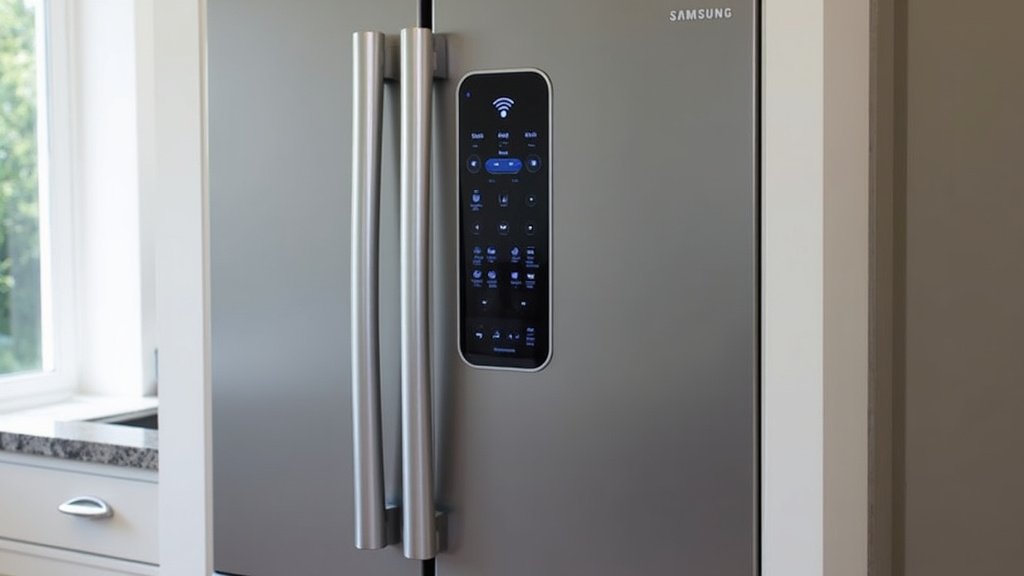
After you’ve replaced the filter, the light will still be on. You need to reset it. This tells the refrigerator that a new filter is installed. The process is usually very straightforward. It involves pressing and holding a specific button or combination of buttons on the control panel.
Common Reset Methods for Your Family Hub
Most Samsung refrigerators use a similar method for resetting the filter light. Here’s what we commonly find:
- Locate the control panel: This is usually on the front of the refrigerator door.
- Find the filter button: Look for a button labeled “Filter,” “Water Filter,” or “Ice Type.”
- Press and hold: Press and hold the designated button for about 3-5 seconds.
- Wait for confirmation: The light should turn off or change color. The display might show a confirmation message.
If this doesn’t work, consult your owner’s manual. Every model can have slight variations. Some might require holding two buttons simultaneously. For instance, you might need to hold “Ice Type” and “Child Lock” for a few seconds. Your manual is your best friend here. It will provide the exact steps for your specific Family Hub model.
Troubleshooting the Reset Process
What if the light doesn’t reset after you follow the steps? Don’t panic! Sometimes, you might have just held the button for too short or too long. Try it again. Ensure you are pressing the correct button. Double-check the specific instructions for your model. If you’ve replaced the filter correctly and flushed the system, the reset should work. If the light persists after multiple attempts, there might be a more technical issue.
In rare cases, a faulty sensor could be the culprit. Or perhaps the control panel itself has an issue. If you’ve exhausted all troubleshooting steps from your manual, it might be time to contact Samsung support. They can provide further guidance. They can also help diagnose if there’s a deeper problem. However, for 99% of situations, a simple button press does the trick!
Conclusion
Your Samsung Family Hub refrigerator’s water filter light is a simple yet important signal. It’s your fridge’s way of telling you it’s time for a fresh filter. Replacing it ensures your family consistently enjoys clean, great-tasting water. We’ve covered why the light turns on, how to find the right filter, and the straightforward steps to replace it and reset the indicator. Don’t let that light cause worry; it’s just routine maintenance. Take action today by ordering your new filter. Your taste buds (and your fridge) will thank you!
Frequently Asked Questions
How often should I really replace my Samsung Family Hub water filter?
Generally, Samsung recommends replacing your filter every six months. However, this can change based on your household’s water usage and the hardness of your water. If you have a large family or use the dispenser a lot, you might need to replace it sooner.
Can I use a generic or aftermarket water filter instead of a Samsung brand one?
While generic filters are available, it’s best to use a genuine Samsung filter. They are designed to fit perfectly and ensure optimal filtration for your Family Hub. Using aftermarket filters could potentially affect performance or even cause leaks.
My water filter light is red, does that mean my water is unsafe to drink?
A red light indicates the filter has reached the end of its lifespan and is no longer effective. While your tap water is likely still safe according to EPA standards, the water quality and taste will be compromised. It’s best to replace the filter as soon as possible.
What should I do if the water filter light doesn’t reset after replacing the filter?
Try the reset procedure again, ensuring you’re pressing the correct button for the specified time. If it still doesn’t reset, consult your refrigerator’s manual for model-specific instructions. In rare cases, there might be a sensor issue requiring professional support.
Why does the water look cloudy or milky after installing a new filter?
This is a common occurrence and usually nothing to worry about. The cloudiness is caused by tiny air bubbles trapped in the new filter. Dispensing a few gallons of water through the new filter will typically clear it up completely.



